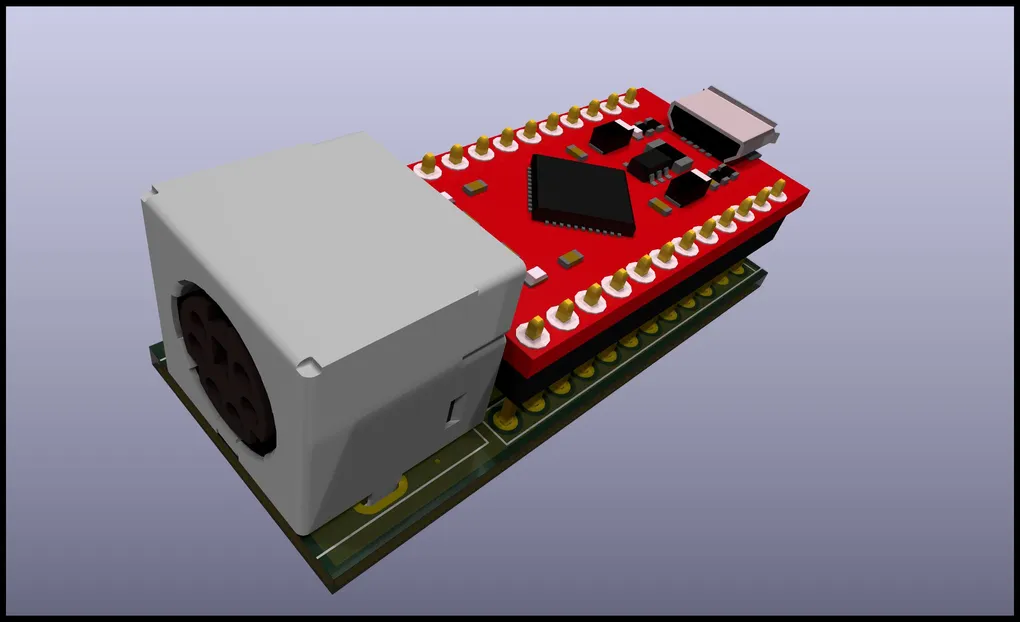
PS2 to USB
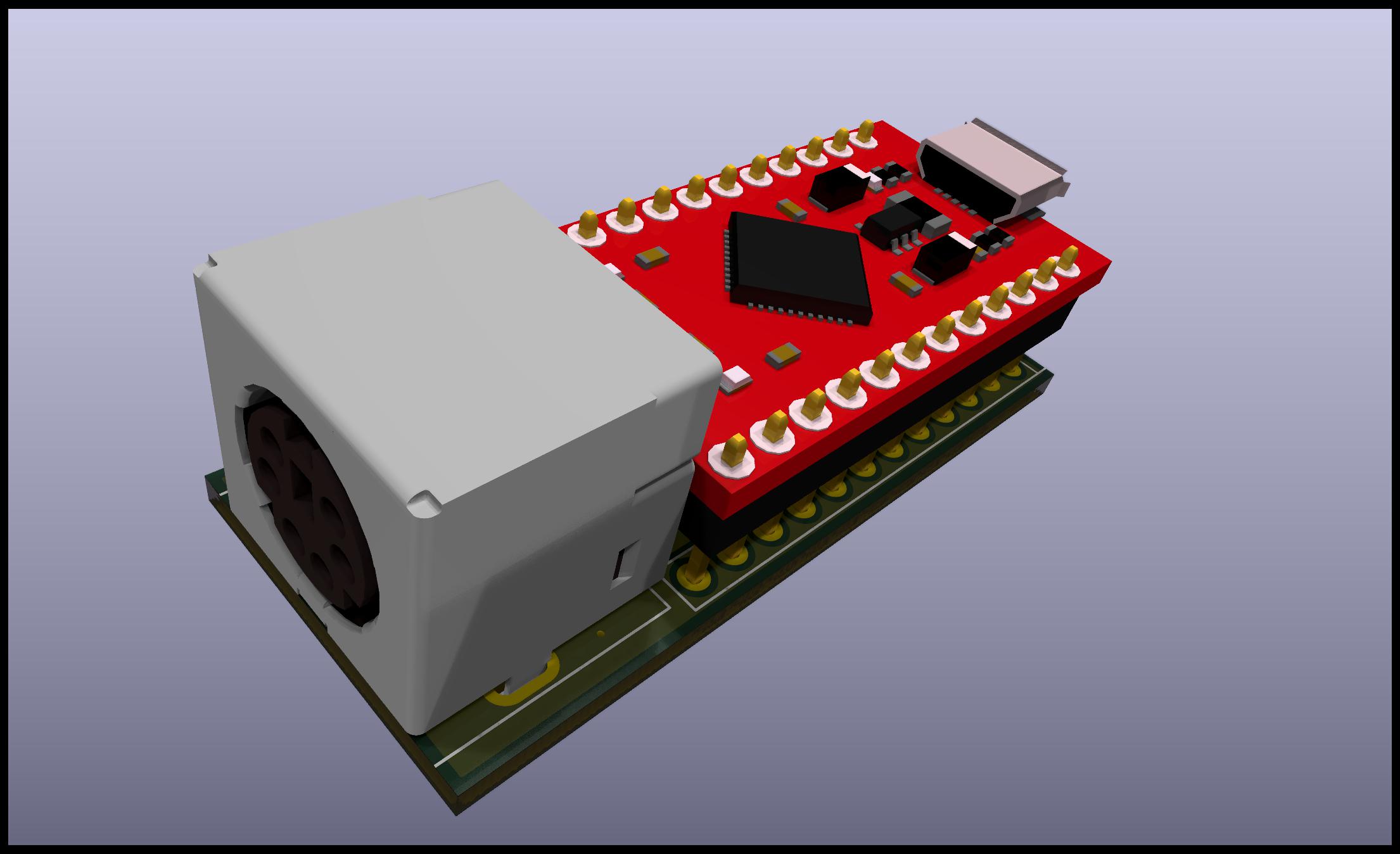
Some KVMs and USB hosts want a plain HID keyboard on the wire, not a composite gadget that also exposes USB serial. This board is a small PS/2 keyboard to USB bridge built around a SparkFun Pro Micro (ATmega32U4). It reads the PS/2 clock and data lines, translates scancodes with the PS2KeyAdvanced library, and sends Boot Keyboard and consumer (media) reports using HID-Project. The default firmware build matches that “basic keyboard” expectation, which is what I needed for ATEN KVMs while still using a vintage PS/2 keyboard.
What you get
- Standard keys, modifiers, arrows, editing block, keypad, and F1–F24 mapped where the PS/2 stack provides codes.
- Media keys (volume, transport, browser, power/sleep, and similar) via HID consumer usage.
- Caps / Num / Scroll lock: the adapter follows the host LED state and forwards lock state to the PS/2 side so the keyboard’s lock LEDs stay coherent.
- Letters and case: Caps Lock and Shift are combined so uppercase/lowercase matches what the host expects.
- Safe mode: optional strap from D2 to GND at boot keeps HID off (handy for recovery or picky enumeration); see Firmware below.
Photos, PCB, and schematic
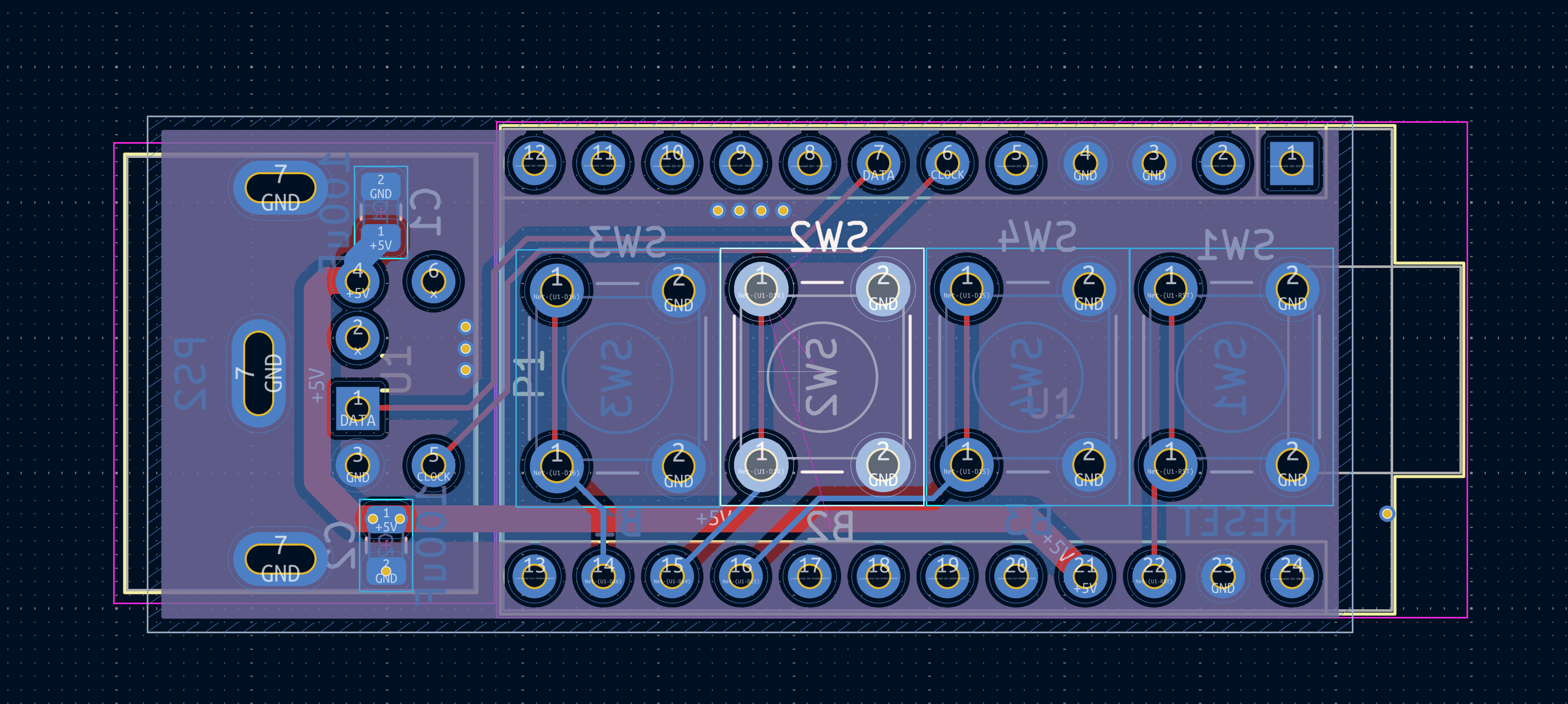
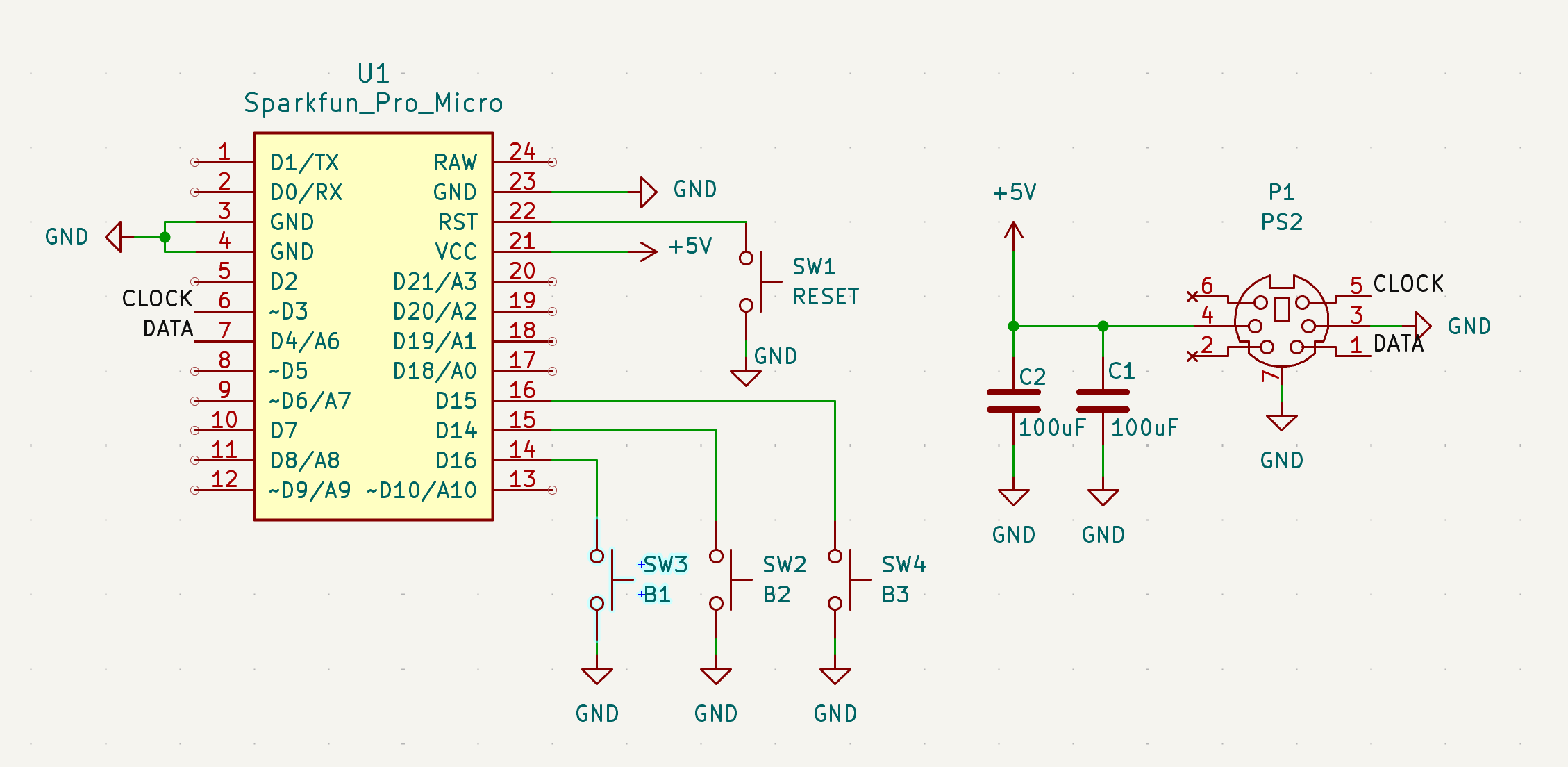
PS2ToUSB.kicad_sch.Bill of materials
| Qty | Item | Notes |
|---|---|---|
| 1 | SparkFun Pro Micro | SparkFun Pro Micro; USB-C or Micro-B depending on the board you buy. |
| 1 | Mini-DIN-6 female, PCB mount | Keyboard PS/2 socket; example search: “Mini DIN 6 female socket”. |
| 2 | 10µF capacitor, 0805 | Unpolarized ceramic per board (example LCSC listing). |
| 4 | 6mm tactile switches (optional) | THT footprint on PCB (example LCSC listing). |
The KiCad project also includes power nets, shield, and Pro Micro pinout as in the schematic. If you substitute another ATmega32U4 board, re-map D3/D4/D2 in firmware to match your wiring.
PS/2 connector pinout
Pin numbering matches the Mini-DIN-6 symbol in the KiCad library used for this project (data and clock on pins 1 and 5, +5V on 4, ground on 3).
Mini-DIN-6 (keyboard PS/2), schematic pin numbers
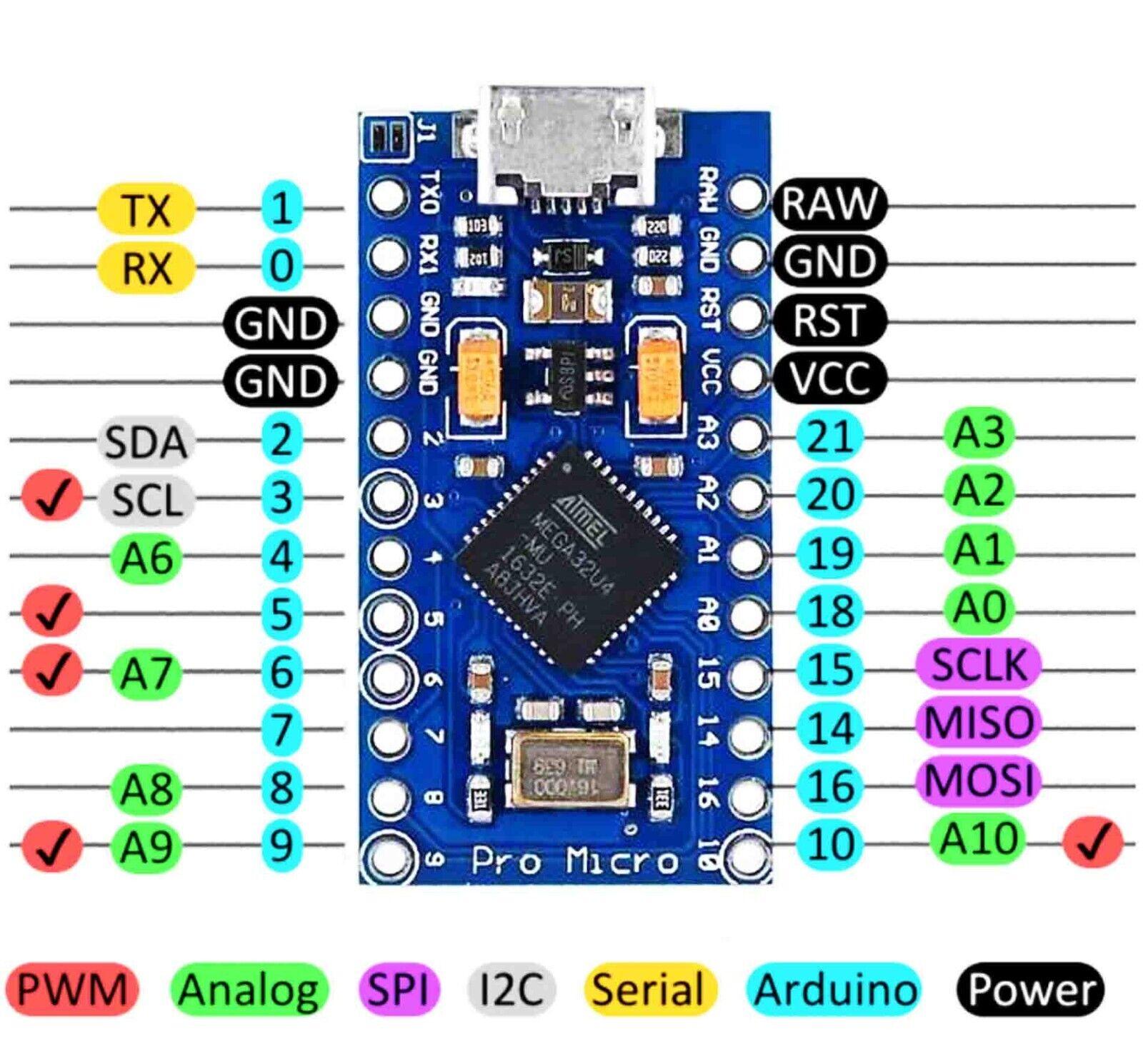
| Pin | Description |
|---|---|
| 1 | Data (to ATmega PS/2 data, firmware DATAPIN 4) |
| 2 | Not used on this design (NC in symbol) |
| 3 | Ground |
| 4 | +5V (from Pro Micro / USB rail per schematic) |
| 5 | Clock (to ATmega PS/2 clock, firmware IRQPIN 3) |
| 6 | Not used (NC) |
| Shell | Shield / chassis tie per PCB |
Firmware pin assignment (Arduino pin numbers on the Pro Micro):
| Signal | Arduino pin | Role |
|---|---|---|
| PS/2 data | 4 | DATAPIN |
| PS/2 clock | 3 | IRQPIN (interrupt-capable pin for the library) |
| Safe mode (to GND) | 2 | SAFEPIN — hold low at boot to keep HID off |
Ordering the PCB (gerbers)
Production gerbers are bundled for a fab such as JLCPCB or PCBWay:
Typical flow: upload the zip, choose 2-layer specs matching the board (1.6mm FR4, HASL or ENIG, your color), and confirm copper layers and outline in the fab’s preview. Order Stencil: no unless you plan reflow for the handful of SMD parts.
Assembly
- Solder SMD first — the two 10µF 0805 capacitors are easier before the tall THT parts.
- Mini-DIN-6 — support the connector while soldering; ensure pins match the silkscreen / schematic orientation so clock and data are not swapped.
- Optional tact switches — populate if you want panel controls; one switch position is intended to strap D2 to ground for safe mode (see firmware). If you skip switches, you can use a jumper wire for recovery the same way.
- Pro Micro — last, so you can still reach the underside if needed. Match USB connector direction to the board outline so the cable exits the intended edge.
- Inspect — continuity-check GND and +5V to the PS/2 socket before first insert of the Pro Micro, and verify no shorts between adjacent DIN pins.
Firmware
The sketch is firmware/PS22USB.ino. It uses:
- PS2KeyAdvanced — PS/2 decode and lock handling.
- HID-Project —
BootKeyboardandConsumerHID interfaces for broad host compatibility.
USB: HID-only vs CDC + HID
On ATmega32U4, USB interfaces are fixed at compile time. The Makefile passes -DCDC_DISABLED by default (CDC_DISABLED=1) so the device enumerates as HID only after keyboard initialization — better for picky KVMs. A composite build with USB serial is available for debugging.
PS22USB — USB enumeration (CDC vs HID-only)
On ATmega32U4 (Pro Micro), USB interfaces are fixed at compile time. The stock Arduino core always includes a CDC ACM interface (USB serial) unless you build with -DCDC_DISABLED.
Default build (make compile / make upload)
- Passes
-DCDC_DISABLEDvia the Makefile (CDC_DISABLED=1). - After
BootKeyboard.begin()/Consumer.begin(), the device enumerates as HID only (no USB serial from the sketch). This matches “basic HID keyboard” expectations for picky hosts. - Safe mode (jumper on pin 2 → GND): PS/2 is drained, HID stays off. There is no USB serial in this build — the onboard LED blinks so you can see safe mode. Remove the jumper to continue into HID mode.
Artifacts go to build/hid-only/ (default) vs build/with-serial/ (CDC_DISABLED=0) so the two firmwares never overwrite the same .hex.
If you change CDC_DISABLED and USB still behaves like the old mode, run make compile-clean once (or arduino-cli cache clean) so the Arduino core is rebuilt with the right flags.
Composite / USB serial build (make compile-serial / make upload-serial)
CDC_DISABLED=0— same composite behavior as a normal Pro Micro sketch: CDC + HID.- Safe mode can use
Serialover USB (messages, monitor), with the usual Pro Micro USB serial / iSerial behavior.
Use this when you need to debug safe mode over USB; use the default build for day-to-day “keyboard only” USB.
Uploading after HID-only builds
With CDC disabled, USB serial is not available for uploads. Use double-tap reset (or your usual Pro Micro bootloader entry) so the board appears as the bootloader device, then upload.
Makefile workflow
Install arduino-cli, cores, and libraries, then compile and upload:
.PHONY: help install compile compile-clean compile-serial upload upload-serial monitor clean list-boards list-ports
# ---- Project settings ----SKETCH       ?= PS22USB.inoBUILD_DIR    ?= build
# SparkFun Pro Micro (ATmega32U4, 5V/16MHz)# Package: SparkFun AVR BoardsFQBN         ?= SparkFun:avr:promicro:cpu=16MHzatmega32U4
# Set this when uploading, e.g.:#   make upload PORT=/dev/cu.usbmodem1101PORT         ?=
# Optional: override baud for monitorBAUD         ?= 115200
# USB CDC (USB serial) — see docs/README.md#   CDC_DISABLED=1 (default): pure HID on USB after HID init (no /dev/tty.* from sketch).#   CDC_DISABLED=0: stock composite CDC + HID (USB Serial works in safe mode; CHIDJB-style).CDC_DISABLED ?= 1
# ---- Arduino CLI ----ARDUINO_CLI  ?= arduino-cli
# ---- Dependencies ----BOARD_CORE   ?= SparkFun:avrLIBS         ?= PS2KeyAdvanced HID-Project
# -DCDC_DISABLED removes CDC from USB descriptors (Arduino AVR core).# Uses compiler.cpp.extra_flags only; board USB -DUSB_VID/… stays in build.extra_flags.COMPILE_EXTRA_FLAGS :=ifeq ($(CDC_DISABLED),1)  COMPILE_EXTRA_FLAGS += --build-property compiler.cpp.extra_flags=-DCDC_DISABLEDendif
# Separate output per variant so HID-only and serial builds never share the same .hex.VARIANT_DIR  := $(if $(filter 1,$(CDC_DISABLED)),hid-only,with-serial)OUTPUT_DIR   := $(BUILD_DIR)/$(VARIANT_DIR)HEX          := $(OUTPUT_DIR)/PS22USB.ino.hex
all: install compile upload monitor
install:  @command -v "$(ARDUINO_CLI)" >/dev/null 2>&1 || { echo "ERROR: arduino-cli not found. Install it first, then re-run 'make install'."; exit 1; }  "$(ARDUINO_CLI)" config init --overwrite >/dev/null 2>&1 || true  "$(ARDUINO_CLI)" core update-index  "$(ARDUINO_CLI)" core install "$(BOARD_CORE)"  @set -e; for lib in $(LIBS); do \    echo "Installing library: $$lib"; \    "$(ARDUINO_CLI)" lib install "$$lib" || true; \  done  @echo "Done. If 'make compile' fails due to a missing lib, tell me the error and I'll add it."
compile: $(HEX)
$(HEX): PS22USB.ino  @command -v "$(ARDUINO_CLI)" >/dev/null 2>&1 || { echo "ERROR: arduino-cli not found."; exit 1; }  "$(ARDUINO_CLI)" compile --fqbn "$(FQBN)" $(COMPILE_EXTRA_FLAGS) --output-dir "$(OUTPUT_DIR)" "$(SKETCH)"
# If USB/CDC behavior looks wrong after toggling CDC_DISABLED, run this once (slow).compile-clean:  @command -v "$(ARDUINO_CLI)" >/dev/null 2>&1 || { echo "ERROR: arduino-cli not found."; exit 1; }  "$(ARDUINO_CLI)" compile --clean --fqbn "$(FQBN)" $(COMPILE_EXTRA_FLAGS) --output-dir "$(OUTPUT_DIR)" "$(SKETCH)"
# Composite CDC + HID (USB Serial in safe mode). Use when debugging safe mode over USB.compile-serial:  @$(MAKE) compile CDC_DISABLED=0
upload-serial:  @$(MAKE) upload CDC_DISABLED=0
upload: $(HEX)  @command -v "$(ARDUINO_CLI)" >/dev/null 2>&1 || { echo "ERROR: arduino-cli not found."; exit 1; }  @test -n "$(PORT)" || { echo "ERROR: PORT is required. Example: make upload PORT=/dev/cu.usbmodem1101"; exit 1; }  "$(ARDUINO_CLI)" upload --fqbn "$(FQBN)" --input-dir "$(OUTPUT_DIR)" -p "$(PORT)" "$(SKETCH)"
monitor:  @command -v "$(ARDUINO_CLI)" >/dev/null 2>&1 || { echo "ERROR: arduino-cli not found."; exit 1; }  @test -n "$(PORT)" || { echo "ERROR: PORT is required. Example: make monitor PORT=/dev/cu.usbmodem1101"; exit 1; }  "$(ARDUINO_CLI)" monitor -p "$(PORT)" -c baudrate="$(BAUD)"
clean:  rm -rf "$(BUILD_DIR)"
list-ports:  "$(ARDUINO_CLI)" board list
Common commands (run inside firmware/):
make install # arduino-cli + SparkFun AVR core + librariesmake compile # default: HID-only → build/hid-only/PS22USB.ino.hexmake upload PORT=/dev/cu.usbmodem1101make compile-serial # CDC + HID → build/with-serial/make compile-clean # if USB mode “sticks” wrong after toggling CDCSketch source
#include <PS2KeyAdvanced.h>#include <HID-Project.h>
// USB serial (CDC) is optional at compile time — see Makefile / docs/README.md.// When CDC is disabled, USB enumerates as HID only (better for picky hosts / KVMs).#if defined(USBCON) && defined(CDC_ENABLED)#define PS22USB_HAVE_USB_SERIAL 1#endif
#define DATAPIN 4#define IRQPIN 3#define SAFEPIN 2 // jumper to GND = safe mode (no HID)
PS2KeyAdvanced keyboard;bool hidEnabled = false;uint8_t lastSyncedPs2Locks = 0xFF;
static inline void syncPs2LocksFromHost() {  // Host LED state is the source of truth for Caps/Num/Scroll lock.  const uint8_t hostLeds = BootKeyboard.getLeds();  uint8_t ps2Locks = 0;
  if (hostLeds & LED_NUM_LOCK) ps2Locks |= PS2_LOCK_NUM;  if (hostLeds & LED_CAPS_LOCK) ps2Locks |= PS2_LOCK_CAPS;  if (hostLeds & LED_SCROLL_LOCK) ps2Locks |= PS2_LOCK_SCROLL;
  if (ps2Locks != lastSyncedPs2Locks) {    keyboard.setLock(ps2Locks);    lastSyncedPs2Locks = ps2Locks;  }}
static inline void sendKeyboard(KeyboardKeycode key, bool isBreak) {  if (isBreak) BootKeyboard.release(key);  else BootKeyboard.press(key);}
static inline void tapKeyboard(KeyboardKeycode key) {  BootKeyboard.press(key);  BootKeyboard.release(key);}
// Apply CapsLock+Shift for letters: uppercase when CapsLock XOR Shift.static inline void sendLetter(KeyboardKeycode key, bool isBreak, uint16_t ps2Flags) {  const bool capsOn = (ps2Flags & PS2_CAPS) != 0;  const bool shiftOn = (ps2Flags & PS2_SHIFT) != 0;  const bool wantUpper = capsOn != shiftOn;
  if (isBreak) {    BootKeyboard.release(key);    if (wantUpper) BootKeyboard.release(KEY_LEFT_SHIFT);  } else {    if (wantUpper) BootKeyboard.press(KEY_LEFT_SHIFT);    BootKeyboard.press(key);  }}
static inline bool ps2ToBootKey(uint8_t code, KeyboardKeycode &out) {  if (code >= PS2_KEY_A && code <= PS2_KEY_Z) {    out = (KeyboardKeycode)(KEY_A + (code - PS2_KEY_A));    return true;  }  if (code >= PS2_KEY_0 && code <= PS2_KEY_9) {    static const KeyboardKeycode kNumberRow[10] = {      KEY_0, KEY_1, KEY_2, KEY_3, KEY_4, KEY_5, KEY_6, KEY_7, KEY_8, KEY_9,    };    out = kNumberRow[code - PS2_KEY_0];    return true;  }  if (code >= PS2_KEY_F1 && code <= PS2_KEY_F24) {    out = (KeyboardKeycode)(KEY_F1 + (code - PS2_KEY_F1));    return true;  }  if (code >= PS2_KEY_KP0 && code <= PS2_KEY_KP9) {    out = (KeyboardKeycode)(KEYPAD_0 + (code - PS2_KEY_KP0));    return true;  }
  switch (code) {    case PS2_KEY_ESC: out = KEY_ESC; return true;    case PS2_KEY_BS: out = KEY_BACKSPACE; return true;    case PS2_KEY_TAB: out = KEY_TAB; return true;    case PS2_KEY_ENTER: out = KEY_ENTER; return true;    case PS2_KEY_SPACE: out = KEY_SPACE; return true;
    case PS2_KEY_APOS: out = KEY_QUOTE; return true;    case PS2_KEY_COMMA: out = KEY_COMMA; return true;    case PS2_KEY_MINUS: out = KEY_MINUS; return true;    case PS2_KEY_DOT: out = KEY_PERIOD; return true;    case PS2_KEY_DIV: out = KEY_SLASH; return true;    case PS2_KEY_SINGLE: out = KEY_TILDE; return true; // ` / ~    case PS2_KEY_SEMI: out = KEY_SEMICOLON; return true;    case PS2_KEY_BACK: out = KEY_BACKSLASH; return true;    case PS2_KEY_OPEN_SQ: out = KEY_LEFT_BRACE; return true;    case PS2_KEY_CLOSE_SQ: out = KEY_RIGHT_BRACE; return true;    case PS2_KEY_EQUAL: out = KEY_EQUAL; return true;
    case PS2_KEY_HOME: out = KEY_HOME; return true;    case PS2_KEY_END: out = KEY_END; return true;    case PS2_KEY_PGUP: out = KEY_PAGE_UP; return true;    case PS2_KEY_PGDN: out = KEY_PAGE_DOWN; return true;    case PS2_KEY_L_ARROW: out = KEY_LEFT_ARROW; return true;    case PS2_KEY_R_ARROW: out = KEY_RIGHT_ARROW; return true;    case PS2_KEY_UP_ARROW: out = KEY_UP_ARROW; return true;    case PS2_KEY_DN_ARROW: out = KEY_DOWN_ARROW; return true;    case PS2_KEY_INSERT: out = KEY_INSERT; return true;    case PS2_KEY_DELETE: out = KEY_DELETE; return true;
    case PS2_KEY_PRTSCR: out = KEY_PRINTSCREEN; return true;    case PS2_KEY_PAUSE: out = KEY_PAUSE; return true;
    case PS2_KEY_MENU: out = KEY_APPLICATION; return true;    // Num/Caps/Scroll are handled in loop() with tapKeyboard() before this runs.
    case PS2_KEY_KP_DOT: out = KEYPAD_DOT; return true;    case PS2_KEY_KP_ENTER: out = KEYPAD_ENTER; return true;    case PS2_KEY_KP_PLUS: out = KEYPAD_ADD; return true;    case PS2_KEY_KP_MINUS: out = KEYPAD_SUBTRACT; return true;    case PS2_KEY_KP_TIMES: out = KEYPAD_MULTIPLY; return true;    case PS2_KEY_KP_DIV: out = KEYPAD_DIVIDE; return true;    case PS2_KEY_KP_EQUAL: out = KEY_PAD_EQUALS; return true;    case PS2_KEY_KP_COMMA: out = KEYPAD_COMMA; return true;
    case PS2_KEY_INTL1: out = KEY_INTERNATIONAL1; return true;    case PS2_KEY_INTL2: out = KEY_INTERNATIONAL2; return true;    case PS2_KEY_INTL3: out = KEY_INTERNATIONAL3; return true;    case PS2_KEY_INTL4: out = KEY_INTERNATIONAL4; return true;    case PS2_KEY_INTL5: out = KEY_INTERNATIONAL5; return true;    case PS2_KEY_LANG1: out = KEY_LANG1; return true;    case PS2_KEY_LANG2: out = KEY_LANG2; return true;    case PS2_KEY_LANG3: out = KEY_LANG3; return true;    case PS2_KEY_LANG4: out = KEY_LANG4; return true;    case PS2_KEY_LANG5: out = KEY_LANG5; return true;  }
  return false;}
static inline bool ps2ToConsumer(uint8_t code, ConsumerKeycode &out) {  switch (code) {    case PS2_KEY_NEXT_TR: out = MEDIA_NEXT; return true;    case PS2_KEY_PREV_TR: out = MEDIA_PREVIOUS; return true;    case PS2_KEY_STOP: out = MEDIA_STOP; return true;    case PS2_KEY_PLAY: out = MEDIA_PLAY_PAUSE; return true;    case PS2_KEY_MUTE: out = MEDIA_VOLUME_MUTE; return true;    case PS2_KEY_VOL_UP: out = MEDIA_VOLUME_UP; return true;    case PS2_KEY_VOL_DN: out = MEDIA_VOLUME_DOWN; return true;
    case PS2_KEY_EMAIL: out = CONSUMER_EMAIL_READER; return true;    case PS2_KEY_CALC: out = CONSUMER_CALCULATOR; return true;    case PS2_KEY_COMPUTER: out = CONSUMER_EXPLORER; return true;
    case PS2_KEY_WEB_HOME: out = CONSUMER_BROWSER_HOME; return true;    case PS2_KEY_WEB_BACK: out = CONSUMER_BROWSER_BACK; return true;    case PS2_KEY_WEB_FORWARD: out = CONSUMER_BROWSER_FORWARD; return true;    case PS2_KEY_WEB_REFRESH: out = CONSUMER_BROWSER_REFRESH; return true;    case PS2_KEY_WEB_FAVOR: out = CONSUMER_BROWSER_BOOKMARKS; return true;
    case PS2_KEY_POWER: out = CONSUMER_POWER; return true;    case PS2_KEY_SLEEP: out = CONSUMER_SLEEP; return true;  }  return false;}
void setup() {  pinMode(SAFEPIN, INPUT_PULLUP);  keyboard.begin(DATAPIN, IRQPIN);


  // Safe mode: keep HID completely disabled while jumper is fitted.  if (digitalRead(SAFEPIN) == LOW) {#if defined(PS22USB_HAVE_USB_SERIAL)    // Composite firmware: USB CDC works — same enumeration as stock Pro Micro + HID later.    Serial.begin(115200);    Serial.println("SAFE MODE ACTIVE (jumper on pin 2 to GND)");    Serial.println("Remove jumper to continue booting into HID mode.");
    while (digitalRead(SAFEPIN) == LOW) {      if (keyboard.available()) {        keyboard.read();      }    }#else    // HID-only firmware: no USB serial. Blink LED so safe mode is visible.    pinMode(LED_BUILTIN, OUTPUT);    unsigned long nextToggle = 0;    bool ledOn = false;    while (digitalRead(SAFEPIN) == LOW) {      if (keyboard.available()) {        keyboard.read();      }      const unsigned long now = millis();      if (now >= nextToggle) {        nextToggle = now + 250;        ledOn = !ledOn;        digitalWrite(LED_BUILTIN, ledOn ? HIGH : LOW);      }    }    digitalWrite(LED_BUILTIN, LOW);#endif  }
  BootKeyboard.begin();  Consumer.begin();  syncPs2LocksFromHost();  hidEnabled = true;}
void loop() {  if (!hidEnabled) return;
  syncPs2LocksFromHost();
  // Drain multiple queued PS/2 events per pass to avoid backlog/overflow.  uint8_t budget = 64;  while (budget-- && keyboard.available()) {    const uint16_t ev = keyboard.read();    const uint8_t code = (uint8_t)(ev & 0xFF);    if (code == 0 || code == 0xFF) continue;
    const bool isBreak = (ev & PS2_BREAK) != 0;
    // Lock keys: USB toggle tap each event (ignore isBreak; PS/2 may mark off as break).    switch (code) {      case PS2_KEY_CAPS:        tapKeyboard(KEY_CAPS_LOCK);        continue;      case PS2_KEY_NUM:        tapKeyboard(KEY_NUM_LOCK);        continue;      case PS2_KEY_SCROLL:        tapKeyboard(KEY_SCROLL_LOCK);        continue;    }
    // Modifier keys (press/release) so chords work correctly.    switch (code) {      case PS2_KEY_L_SHIFT: sendKeyboard(KEY_LEFT_SHIFT, isBreak); continue;      case PS2_KEY_R_SHIFT: sendKeyboard(KEY_RIGHT_SHIFT, isBreak); continue;      case PS2_KEY_L_CTRL: sendKeyboard(KEY_LEFT_CTRL, isBreak); continue;      case PS2_KEY_R_CTRL: sendKeyboard(KEY_RIGHT_CTRL, isBreak); continue;      case PS2_KEY_L_ALT: sendKeyboard(KEY_LEFT_ALT, isBreak); continue;      case PS2_KEY_R_ALT: sendKeyboard(KEY_RIGHT_ALT, isBreak); continue;      case PS2_KEY_L_GUI: sendKeyboard(KEY_LEFT_GUI, isBreak); continue;      case PS2_KEY_R_GUI: sendKeyboard(KEY_RIGHT_GUI, isBreak); continue;    }
    // Multimedia / "consumer" keys.    ConsumerKeycode consumerKey;    if (ps2ToConsumer(code, consumerKey)) {      if (!isBreak) Consumer.write(consumerKey);      else Consumer.release(consumerKey);      continue;    }
    // Standard keyboard keys.    KeyboardKeycode bootKey;    if (ps2ToBootKey(code, bootKey)) {      // Letters need CapsLock+Shift applied for correct case.      if (code >= PS2_KEY_A && code <= PS2_KEY_Z)        sendLetter(bootKey, isBreak, ev);      else        sendKeyboard(bootKey, isBreak);      continue;    }  }}
Build output folders
After make compile, artifacts land under:
firmware/build/hid-only/— default KVM-friendly image.firmware/build/with-serial/—make compile-serialcomposite firmware.
The repository may also contain older test hex under firmware/build_cdc_test/; prefer the build/ tree from the Makefile for reproducible builds.
First boot and testing
- Flash the Pro Micro with
make upload(or the Arduino IDE equivalent using the same FQBN and extra flags as the Makefile). - Default HID-only builds: if the OS never shows a serial port, use double-tap reset to enter the bootloader before each upload.
- Connect a known-good PS/2 keyboard, then plug USB into the host or KVM port.
- Verify lock keys (Num/Caps/Scroll) sync LEDs on the keyboard when toggled from the host.
- Try media keys if your keyboard has them.
Files in this project (quick index)
| Asset / path | Purpose |
|---|---|
| Assembled photo | Hero / build reference |
| Schematic PNG | Shareable schematic |
| PCB render | Layout preview |
| Gerbers zip | Fabrication upload (ps2usb-gerbers.zip) |
| Pinout photo | Socket wiring visual |
firmware/PS22USB.ino | Main sketch (in site repo) |
firmware/Makefile | arduino-cli build |
firmware/docs/README.md | CDC vs HID-only notes |
PS2ToUSB.kicad_pro, .kicad_sch, .kicad_pcb | KiCad sources (in site repo; not bundled into static dist/) |
Together, these are enough to order a PCB, assemble the board, build and flash firmware, and integrate the adapter with a PS/2 keyboard and a demanding USB host or KVM.